 Multi Cursor
A cursor of your own while AI worksAI가 일하는 동안 쓰는 나만의 커서
Multi Cursor adds separate cursors to your Mac or Windows PC. Your AI keeps the real pointer, and you keep clicking and typing somewhere else.멀티 커서는 맥과 윈도우에 별도의 커서를 더합니다. AI가 실제 커서를 쓰는 동안에도 다른 창에서 계속 클릭하고 입력할 수 있습니다.
Download free trial무료 체험 내려받기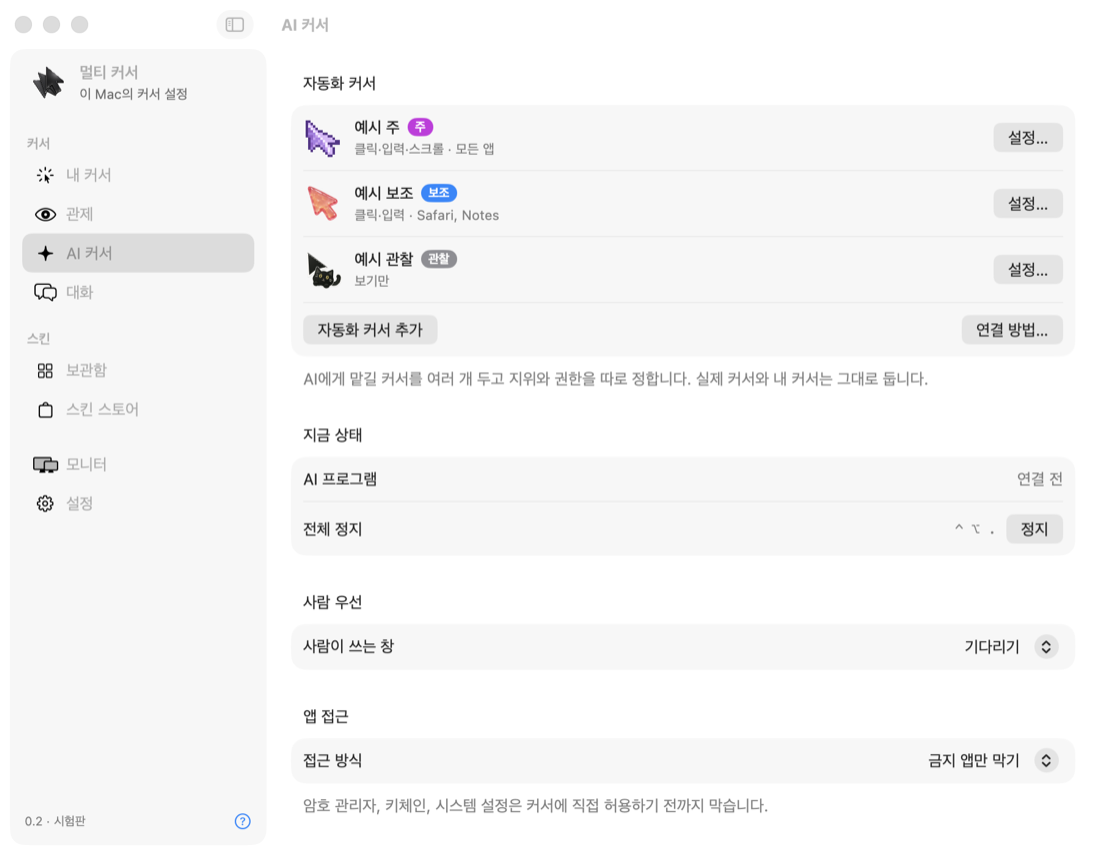
What it does주요 기능
Separate cursors별도의 커서
Click, drag, scroll and type with a cursor that does not move the real pointer or change the front window.실제 커서와 앞쪽 창을 건드리지 않고 클릭, 끌기, 스크롤, 입력을 합니다.
You decide what AI can useAI 점유를 내가 결정
When a program tries to take the real pointer, Multi Cursor asks first. Allow it, block it, or set a rule per app.다른 프로그램이 실제 커서를 쓰려 하면 먼저 묻습니다. 허용하거나 막고, 앱별로 규칙을 정할 수 있습니다.
Automation cursors자동화 커서
Give AI programs their own cursors with a rank, permissions, and limits by display and app.AI 프로그램에 전용 커서를 주고 지위, 권한, 모니터와 앱 범위를 정합니다.
See where AI is workingAI 작업 위치 확인
A display map shows which screen and window each cursor is using, on top of your real wallpaper.실제 배경화면 위에서 각 커서가 어느 모니터와 창을 쓰는지 보여 줍니다.
People first사람 우선
Automation cursors step aside from the window you are using. One shortcut stops them all.자동화 커서는 내가 쓰는 창을 비켜 줍니다. 단축키 하나로 전체를 멈출 수 있습니다.
Stays on your computer내 컴퓨터 안에서 동작
Your keystrokes, screen contents and window activity are not sent to us. The AI connection opens on this computer only.입력 내용, 화면, 창 활동은 회사로 보내지 않습니다. AI 연결은 이 컴퓨터 안에서만 열립니다.
180 cursor designs커서 디자인 180종












Download내려받기
macOS
macOS 15 or later · Apple silicon · Notarized by ApplemacOS 15 이상 · Apple 실리콘 · Apple 공증 완료
Unzip, move to Applications, then allow Accessibility and Input Monitoring when asked.압축을 풀어 응용 프로그램 폴더로 옮긴 뒤, 안내에 따라 손쉬운 사용과 입력 모니터링을 허용해 주십시오.
Windows
Windows 10 or 11 · 64-bitWindows 10·11 · 64비트
Unzip and run MultiCursor.exe. If SmartScreen appears, choose More info, then Run anyway.압축을 풀고 MultiCursor.exe를 실행해 주십시오. SmartScreen 경고가 나오면 추가 정보를 누른 뒤 실행을 고르면 됩니다.
Version 0.2.0. All features are free for 14 days.버전 0.2.0. 모든 기능을 14일 동안 무료로 쓸 수 있습니다.
Pricing가격
Annual pass연간 이용권
Multiple cursors, automation cursors, monitoring and automatic updates for one year. One payment. It does not renew automatically.여러 커서, 자동화 커서, 관제, 자동 업데이트를 1년 동안 씁니다. 한 번만 결제하며 자동으로 갱신되지 않습니다.
5 design credits디자인 크레딧 5개
Unlock any five premium cursor designs.원하는 유료 디자인 5개를 엽니다.
Design collection디자인 컬렉션
Unlock one collection of six designs.6종으로 이루어진 컬렉션 하나를 엽니다.
All designs전체 디자인
Unlock every premium design.모든 유료 디자인을 엽니다.
Includes a 14-day free trial of all features. After the trial, one cursor stays free. Prices are in US dollars. Tax may be added at checkout. Payments are processed by Creem, our merchant of record.모든 기능을 14일 동안 무료로 체험할 수 있습니다. 체험이 끝나도 커서 1개는 무료입니다. 가격은 미국 달러 기준이며 결제 시 세금이 더해질 수 있습니다. 결제는 판매 대행사 Creem이 처리합니다.
Support고객 지원
Questions or problems? Email 문의는 다음 주소로 보내 주십시오. contact@speciai.ai.kr